 Chat with us

Call us now :07971671080
 Send Inquiry
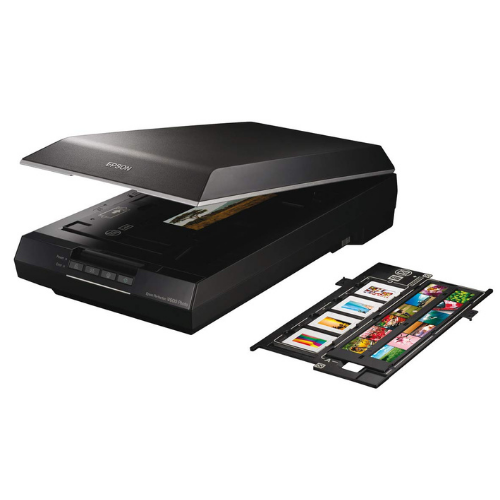
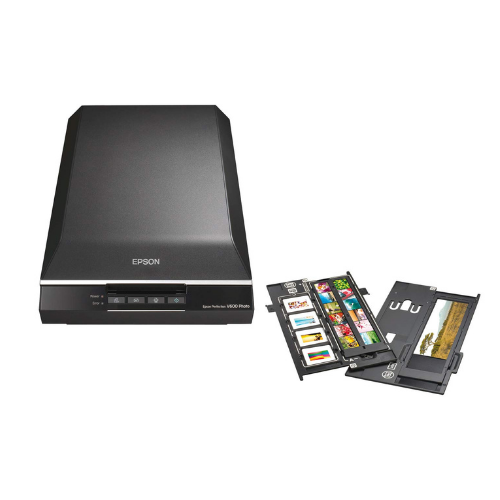
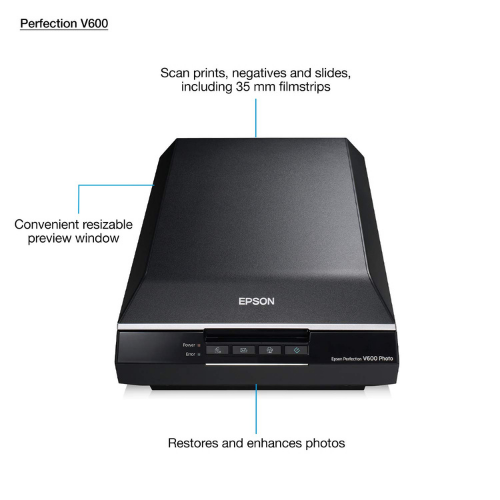
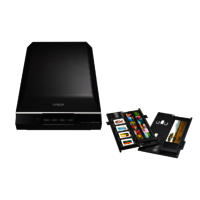
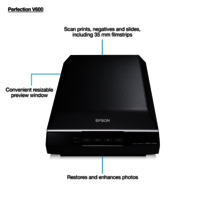
Epson V600 Flatbed Photo Scanner
20075 INR/Box
Product Details:
- Noise Level Less than 49 dB
- Usage & Applications Photo, film, document and slide scanning for home and office
- Dimension (L*W*H) 280 x 485 x 118 mm
- Scan Speed 21 sec (A4, 300 dpi, color) approx.
- Connectivity Type USB 2.0
- Paper Size A4, Letter, Legal, Photo Sizes
- Power Consumption 16.5 W (operating), 1.6 W (sleep)
- Click to View more
X
Epson V600 Flatbed Photo Scanner Price And Quantity
- 20075 INR/Box
- 1 Box
- 3.4 Dmax
- Carry-in
- Epson Scan, ArcSoft PhotoStudio, ABBYY FineReader Sprint
- 35mm strip film, 35mm mounted film, Medium format
- Windows XP/Vista/7/8/10, Mac OS X
- Yes
- 1GB RAM, USB 2.0 port, 1.2GB free disk space
- 216 x 297 mm (8.5 x 11.7 in.)
- White LED
Epson V600 Flatbed Photo Scanner Product Specifications
- Film holders for 35mm slides and negatives
- Portable
- Digital ICE, LED light source, Energy Efficient, Advanced Dust and Scratch Removal
- Flatbed A4
- Less than 49 dB
- 48-bit internal / 48-bit external
- A4 / Letter
- 16.5 W (operating), 1.6 W (sleep)
- Flatbed & Film
- Document, Photo, Film and Slide Scanner
- 21 sec (A4, 300 dpi, color) approx.
- USB 2.0
- Approximately 4.1 kg
- A4, Letter, Legal, Photo Sizes
- Flatbed Photo Scanner
- USB 2.0
- 6400 x 9600 dpi
- Photo, film, document and slide scanning for home and office
- 280 x 485 x 118 mm
- High Resolution Digital Images
- 3.4 Dmax
- Carry-in
- Epson Scan, ArcSoft PhotoStudio, ABBYY FineReader Sprint
- 35mm strip film, 35mm mounted film, Medium format
- Windows XP/Vista/7/8/10, Mac OS X
- Yes
- 1GB RAM, USB 2.0 port, 1.2GB free disk space
- 216 x 297 mm (8.5 x 11.7 in.)
- White LED
Epson V600 Flatbed Photo Scanner Trade Information
- All India
Product Description
| Model Number | V600 |
| Scanner |
|
| Scanner Type | Flatbed colour image scanner |
| Scanning Method | Fixed document and moving carriage |
| Light Source | White LED, LR LED |
| Optical Resolution | Main 6,400 dpi x Sub 9,600 dpi *1 |
| Output Resolution | 50 to 6400, 9600, 12800 dpi (50 to 6400 dpi in 1 dpi increments) *3 |
| Bit Depth |
|
| Colour | 48-bit input, 48/24-bit output |
| Greyscale | 16-bit input, 16/8-bit output |
| Black & White | 16-bit input, 1-bit output |
| Document Size | 216 x 297mm (A4, US Letter size document) |
| Interface | USB 2.0 *2 |
| Scanning Speed *2 |
|
| Resolution (Colour / Monochrome) |
|
| 300dpi | 6 sec |
| 600dpi | 23sec |
| Drivers and Software |
|
| Supported OS (Scanner Driver) |
|
| Windows | Windows XP / Vista / 7 / 8 / 8.1 / 10 Mac OS X 10.5.8 or later |
| Software Bundle | Epson Scan v3.9, Epson Copy Utility, Epson Event Manager, ABBYY FineReader Sprint 9.0 (Win) / 8.0 (Mac), Easy Photo Scan |
Exceptional Image Quality
With an optical density of 3.4 Dmax and a scanning resolution of up to 6400 x 9600 dpi, the Epson V600 Flatbed Photo Scanner captures every detail in your photos, films, and slides. The advanced Digital ICE technology helps remove dust and scratches, resulting in clean, professional scans every time. Its 48-bit color depth delivers vibrant, lifelike colors.
Versatile Film and Document Scanning
The V600 is equipped to handle 35mm strip film, mounted slides, and medium format films using included film holders. Its spacious A4-size flatbed also accommodates a variety of document and photo sizes, making it perfect for both creative and business applications, including archiving, editing, and sharing your memories.
Energy Efficient and User-Friendly
Energy Star certified, the V600 consumes just 16.5 W during operation and 1.6 W in sleep mode. Its white LED light source ensures instant illumination without warm-up time, while bundled software simplifies image enhancement and document management. Compatible with both Windows and Mac systems, setup is easy with just a USB 2.0 connection.
FAQ's of Epson V600 Flatbed Photo Scanner:
Q: How do I scan film negatives and slides using the Epson V600?
A: The Epson V600 comes with film holders for 35mm negatives, slides, and medium format film. Place your film or slides into the appropriate holder, position it on the scanner bed, and use Epson Scan software to select the film type and desired resolution, then scan and save your high-resolution digital files.Q: What are the minimum system requirements to install and operate the Epson V600?
A: To operate the Epson V600, you'll need a computer with at least 1GB RAM, a USB 2.0 port, 1.2GB of free disk space, and either Windows XP/Vista/7/8/10 or Mac OS X. Make sure these requirements are met for smooth installation and usage.Q: When should I use the Digital ICE technology feature?
A: Use Digital ICE technology when scanning photographs, films, or slides that show prominent dust, scratches, or surface imperfections. This advanced feature automatically detects and removes these flaws during scanning, saving you editing time and preserving image quality.Q: Where can I find support or warranty service for the Epson V600 in India?
A: Warranty service in India is provided as a 'Carry-in' warranty, meaning you bring your scanner to an authorized Epson service center. For additional support, you can contact Epson dealers, distributors, or authorized service providers in your area.Q: What types of media can the Epson V600 scan?
A: The Epson V600 supports scanning of photo prints, A4/Letter/Legal documents, 35mm strip and mounted films, as well as medium format films. Its film holders and flatbed design make it versatile for various scanning tasks, both at home and in the office.Q: How energy efficient is the Epson V600 scanner?
A: The Epson V600 is Energy Star certified, consuming only 16.5 W during scanning and 1.6 W in sleep mode. Its white LED light source not only saves energy but also provides instant-on functionality for quicker scanning sessions.Q: What are the key benefits of using the Epson V600 for digitizing old photographs?
A: By leveraging high resolution, advanced dust and scratch removal, and bundled editing software, the Epson V600 enables you to easily digitize, enhance, and preserve your old photographs and films, ensuring your memories are archival-quality and ready to share or print.Tell us about your requirement

Price:
Quantity
Select Unit
- 50
- 100
- 200
- 250
- 500
- 1000+
Additional detail
Mobile number
Email

Other Products in 'Scanner' category

We mainly handle local order inquiries.
 Send Inquiry


Our Products



A-803, KeyTech Park, Oshiwara. S. V. Road, Jogeshwari West,Mumbai - 400102, Maharashtra, India

Mr Sachin Gavali
(CEO)
Mobile :07971671080
 Send Inquiry
 Send SMS
Developed and Managed by Infocom Network Private Limited.


