 Chat with us

Call us now :07971671080
 Send Inquiry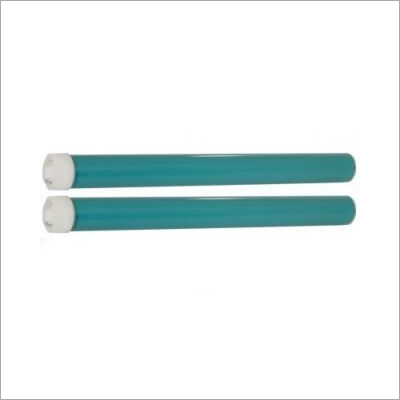
HP 12A Compatible OPC Drum
2300 INR/Box
Product Details:
- Size Standard
- Feature High durability, Long life cycle, Smooth printing performance
- Usage & Applications Printer toner cartridge replacement for HP 12A series
- Weight Approx. 60g
- Color Green
- Product Type Compatible OPC Drum
- Product Name HP 12A Compatible OPC Drum
- Click to View more
X
HP 12A Compatible OPC Drum Price And Quantity
- 1 Box
- 2300 INR/Box
- Up to 12,000 pages (A4/5% coverage)
- HP LaserJet 1010, 1012, 1015, 1018, 1020, 1022, 3015, 3020, 3030, 3050, 3052, 3055
- Glossy
- OEM Equivalent
- Aluminum with organic photoconductor coating
- No
- 10C 35C
- -20C 40C
HP 12A Compatible OPC Drum Product Specifications
- Green
- Approx. 60g
- Printer toner cartridge replacement for HP 12A series
- HP 12A
- Compatible OPC Drum
- HP 12A Compatible OPC Drum
- High durability, Long life cycle, Smooth printing performance
- Standard
- Up to 12,000 pages (A4/5% coverage)
- HP LaserJet 1010, 1012, 1015, 1018, 1020, 1022, 3015, 3020, 3030, 3050, 3052, 3055
- Glossy
- OEM Equivalent
- Aluminum with organic photoconductor coating
- No
- 10C 35C
- -20C 40C
HP 12A Compatible OPC Drum Trade Information
- All India
Product Description
HI-TECH OPC Drums Give Extra Darkness, And Better Life Cycle.Hi-Tech Drums Ensure Spotless Printouts Even In Image Prints.Hi-Tech Drums Give Higher Page Yields.HI-TECH HP 2612 / 1010 / 1022 / 1015/ 1018/ 1020/ 1022/ 1319/3015/ 3020/ 3030/ 3050/ 3052 / 1005 /Canon 103 / Fx 9 / LBP 2900
OEM-Equivalent Quality and Performance
Enjoy outstanding printing results with an OPC drum engineered to match original equipment manufacturer standards. The robust aluminum base and organic photoconductor coating deliver crisp, clear prints and support a high page yield, making it a dependable choice for busy offices or home users requiring professional quality output.
Broad Printer Compatibility
This drum is compatible with a wide range of HP LaserJet models, including 1010, 1012, 1015, 1018, 1020, 1022, 3015, 3020, 3030, 3050, 3052, and 3055 series. This versatility ensures easy integration, allowing users to conveniently replace worn-out drums across multiple environments using HP 12A series cartridges.
Smooth Printing and Long Life Cycle
With a life cycle of up to 12,000 pages, this OPC drum offers extended service and high durability. The glossy surface promotes smooth toner transfer, reducing print defects and enhancing page clarity, while its sturdy construction ensures consistent performance during its lifespan.
FAQ's of HP 12A Compatible OPC Drum:
Q: How do I install the HP 12A Compatible OPC Drum in my printer?
A: To install the HP 12A Compatible OPC Drum, open your printer's toner cartridge compartment, carefully remove the old drum unit, and insert the new OPC drum into your HP 12A series toner cartridge. Ensure it sits securely before reassembling the cartridge and closing the compartment. Refer to your printer manual for detailed instructions.Q: What printers are compatible with the HP 12A Compatible OPC Drum?
A: This OPC drum is designed for use with several HP LaserJet models, including 1010, 1012, 1015, 1018, 1020, 1022, 3015, 3020, 3030, 3050, 3052, and 3055, making it a versatile replacement for a wide range of office machines.Q: When should I replace my HP 12A OPC Drum?
A: It is recommended to replace the OPC drum after approximately 12,000 pages of printing or when you notice a decline in print quality, such as faded images, streaks, or repeated marks on your documents.Q: Where should I store unused HP 12A OPC Drums?
A: Store unused OPC drums in a cool, dry location between -20C and 40C. Avoid exposing them to direct sunlight or high humidity to preserve the organic photoconductor coating and maintain optimal performance.Q: What is the process for recycling old OPC drums?
A: You can recycle old OPC drums by returning them to authorized e-waste collection centers or participating HP recycling programs. Proper disposal ensures environmentally responsible management of electronic waste and helps protect the environment.Q: What are the benefits of using this compatible OPC drum over the original?
A: The HP 12A Compatible OPC Drum offers comparable print quality and durability to OEM parts at a lower cost. Its robust construction and high page yield provide cost-effective performance without sacrificing print clarity.Tell us about your requirement

Price:
Quantity
Select Unit
- 50
- 100
- 200
- 250
- 500
- 1000+
Additional detail
Mobile number
Email

Other Products in 'Cartridges' category

We mainly handle local order inquiries.
 Send Inquiry


Our Products



A-803, KeyTech Park, Oshiwara. S. V. Road, Jogeshwari West,Mumbai - 400102, Maharashtra, India

Mr Sachin Gavali
(CEO)
Mobile :07971671080
 Send Inquiry
 Send SMS
Developed and Managed by Infocom Network Private Limited.


