 Chat with us

Call us now :07971671080
 Send Inquiry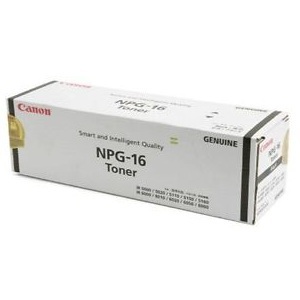
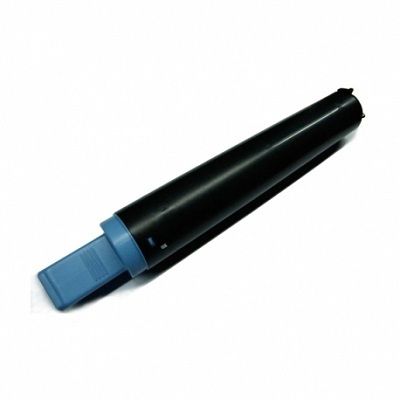
Canon Npg16 Original Black Toner Cartridge
7000 INR/Box
Product Details:
- Size Standard
- Color Black
- Weight Approx. 500 g
- Usage & Applications For use in Canon imageRUNNER series printers and copiers
- Feature High yield, crisp and clear prints, compatible with various Canon devices
- Product Type Toner Cartridge
- Product Name Canon Npg16 Original Black Toner Cartridge
- Click to View more
X
Canon Npg16 Original Black Toner Cartridge Price And Quantity
- 7000 INR/Box
- 1 Box
- Canon imageRUNNER 3570, 4570, 2270, 2870, 2230, 2830, 3025, 3030 series
- OEM (Original Equipment Manufacturer)
- 10°C - 40°C
- Approximately 21,000 pages at 5% coverage
- Black
- 1 x NPG-16 Black Toner Cartridge
- 15°C - 35°C
- Up to 24 months
- Laser
Canon Npg16 Original Black Toner Cartridge Product Specifications
- Standard
- Black
- Approx. 500 g
- NPG16
- Toner Cartridge
- Canon Npg16 Original Black Toner Cartridge
- High yield, crisp and clear prints, compatible with various Canon devices
- For use in Canon imageRUNNER series printers and copiers
- Canon imageRUNNER 3570, 4570, 2270, 2870, 2230, 2830, 3025, 3030 series
- OEM (Original Equipment Manufacturer)
- 10°C - 40°C
- Approximately 21,000 pages at 5% coverage
- Black
- 1 x NPG-16 Black Toner Cartridge
- 15°C - 35°C
- Up to 24 months
- Laser
Canon Npg16 Original Black Toner Cartridge Trade Information
- All India
Product Description
| Model | NPG 16 |
| Color | Black |
| Brand | Canon |
| Body Material | Plastic |
| Cartridges Status | Full |
| Feature | Original, CompatibleiR5000, 5000i, 6000, 6000i, 6020i |
| Yield | 33000 prints @ 5% Covrage Area |
High-Yield Performance and Consistency
Canon Npg16 Original Black Toner Cartridge offers high yield, delivering up to 21,000 pages at standard coverage. Its laser technology ensures sharp, reliable prints, making it suitable for high-volume printing in professional settings. The toners OEM quality provides consistent performance and longevity, giving offices peace of mind for both daily use and long-term projects.
Wide Compatibility with Canon imageRUNNER Series
Compatible with a broad range of Canon imageRUNNER models, including 3570, 4570, 2270, 2870, 2230, 2830, 3025, and 3030, this toner cartridge seamlessly integrates with your devices. Its versatile compatibility allows businesses with diverse Canon fleets to streamline their supply needs and maintain efficient printing operations without worrying about fitting issues.
Simple Installation and Efficient Use
Designed for user-friendly installation, the Canon Npg16 cartridge ensures minimal downtime and straightforward replacement. Operators can quickly swap cartridges as needed, facilitating uninterrupted workflow. The cartridges optimal operating temperature range (15C35C) and storage range (10C40C) add further practicality for everyday business environments.
FAQs of Canon Npg16 Original Black Toner Cartridge:
Q: How do I install the Canon Npg16 Original Black Toner Cartridge in my Canon imageRUNNER device?
A: To install the Canon Npg16 toner, open your printers front cover, remove the used cartridge, and insert the new cartridge securely into the designated slot. Make sure it clicks into place before closing the cover. Always follow your devices user manual for specific installation instructions.Q: What Canon printer models are compatible with the Npg16 toner cartridge?
A: The Canon Npg16 Original Black Toner Cartridge is compatible with the following Canon imageRUNNER series models: 3570, 4570, 2270, 2870, 2230, 2830, 3025, and 3030. It is designed to ensure optimal performance with these specific printers and copiers.Q: When should I replace the Canon Npg16 toner cartridge?
A: You should replace the cartridge when print quality decreases or your printer notifies you that toner levels are low or depleted. For typical office use, this cartridge yields up to 21,000 pages at 5% coverage, but replacement frequency depends on your printing volume.Q: Where can I store the Canon Npg16 toner cartridge for maximum shelf life?
A: Store the cartridge in a cool, dry place with temperatures between 10C and 40C and away from direct sunlight. Proper storage ensures the toner retains its quality and has a shelf life of up to 24 months.Q: What is the benefit of using an original Canon Npg16 toner cartridge?
A: Using the original Canon Npg16 toner assures compatible, high-quality prints with clear text and graphics. OEM cartridges also help minimize printer wear and support efficient operations, reducing the risk of malfunctions associated with third-party alternatives.Q: How does the Canon Npg16 toner cartridge contribute to efficient printing processes?
A: The high yield and reliable print quality reduce the need for frequent cartridge changes, streamlining office workflows. The cartridges standard size and easy installation process further enhance productivity and uptime.Tell us about your requirement

Price:
Quantity
Select Unit
- 50
- 100
- 200
- 250
- 500
- 1000+
Additional detail
Mobile number
Email

Other Products in 'Cartridges' category

We mainly handle local order inquiries.
 Send Inquiry


Our Products



A-803, KeyTech Park, Oshiwara. S. V. Road, Jogeshwari West,Mumbai - 400102, Maharashtra, India

Mr Sachin Gavali
(CEO)
Mobile :07971671080
 Send Inquiry
 Send SMS
Developed and Managed by Infocom Network Private Limited.


