 Chat with us

Call us now :07971671080
 Send Inquiry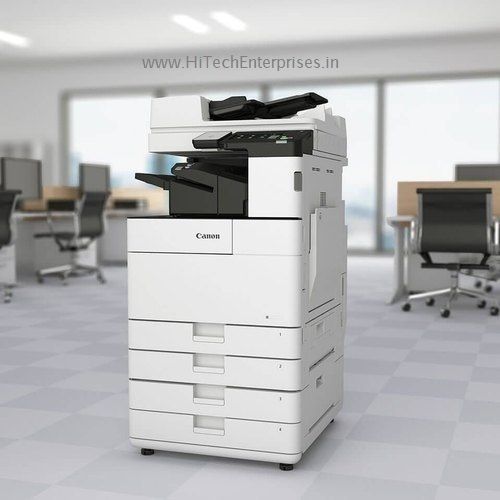
Canon Ir 2625 Mono A3 Size Photocopier Machine
Product Details:
- Type Mono A3 Size Photocopier Machine
- Condition New
- Print Speed 25 pages per minute (A4)
- Zoom Range 25% 400% (in 1% increments)
- Scanning Resolution 600 x 600 dpi
- Warm-up Time 14 seconds or less
- First Copy Time Approx. 5.9 seconds
- Click to View more
X
Canon Ir 2625 Mono A3 Size Photocopier Machine Product Specifications
- 256 levels
- A3, A4, A5, B4, B5, Envelope (C5, DL, COM10) and custom sizes
- Approx. 5.9 seconds
- 25 pages per minute (A4)
- 14 seconds or less
- 220-240V, 50/60Hz
- Monochrome Laser (Electrostatic Transfer System)
- 600 x 600 dpi
- 25 CPM (copies per minute)
- Mono A3 Size Photocopier Machine
- New
- Approx. 44.9 kg
- Paper cassette: 60 to 120 gsm; Multi-purpose tray: 60 to 163 gsm
- 587 mm 653 mm 787 mm
- 25% 400% (in 1% increments)
- Standard 10Base-T/100Base-TX/1000Base-T
- Ethernet, USB 2.0
- 2 GB RAM
- Windows, Mac OS, Linux
- Up to 80,000 pages
- 600 x 600 dpi
- Standard
- Maximum Approx. 1.5 kW
- Less than 70 dB (operation)
- 7-inch Colour Touch Panel
- 1.75 GHz Dual Core Processor
- up to 2300 sheets
- up to 1200 sheets
Canon Ir 2625 Mono A3 Size Photocopier Machine Trade Information
- All India
Product Description
Description
| Machine Make and Model | Canon IR 2625 (Basic) |
| Functions | Print, Copy, Scan, Send and Optional Fax |
| Paper Size Max | A3 |
| Copy/ Print Speed | 25 PPM |
| Copy, Print, Scan Resolutions (DPI) | 600, 1200, 600 |
| PC/ Connectivity/ Interface | USB 2.0 Network (LAN), Wifi |
| Paper weight Min /Max | 60 to 128 Gsm |
| Memory/ Ram | 2GB RAM |
| Hard Disk | NA |
| DADF / Auto Duplex Print / Scan | Optional |
| Paper Tray (Sheets) | Tray 1 X 550, Tray 2 X 550, Bypass 1 X 100 |
| Dimension (W X D X H ) MM | 586 X 700 x 816 |
| Power Consumption | 1500 W |
| Monthly Duty Capacity | 25,000 |
| Optional Accessories | 2 Paper Tray, Trolley, Toner Cartridge |
Advanced Performance and Speed
The Canon IR 2625 delivers exceptional speed and reliability, boasting a print and copy speed of 25 pages per minute for A4 documents. With automatic duplex printing and a powerful dual-core processor backed by 2 GB RAM, it ensures that large print jobs are handled smoothly and efficiently without delays.
User-Friendly Interface and Versatility
An intuitive 7-inch color touch panel simplifies operation, providing easy access to all major functions. The device supports a broad range of paper sizes, including A3, A4, A5, and envelopes, making it suitable for various business needs. Customizable tray settings help handle unique media requirements effortlessly.
Robust Connectivity and Compatibility
Standard network capabilities, including 10Base-T/100Base-TX/1000Base-T Ethernet and USB 2.0 interface, enable effortless connectivity to office networks and devices. The Canon IR 2625 is compatible with Windows, Mac OS, and Linux, ensuring seamless integration regardless of your organizations IT setup.
FAQs of Canon Ir 2625 Mono A3 Size Photocopier Machine:
Q: How does the Canon IR 2625 Mono A3 Photocopier benefit my office operations?
A: This photocopier offers swift and efficient document handling, with fast print speeds and a high monthly duty cycle of up to 80,000 pages. Its duplex printing feature saves paper while the large capacity trays minimize frequent refilling, making it ideal for high-volume, cost-effective workflow.Q: What types and sizes of paper can the Canon IR 2625 handle?
A: The machine supports a diverse range of paper sizes including A3, A4, A5, B4, B5, as well as envelopes (C5, DL, COM10) and custom sizes. Paper weight compatibility ranges from 60 to 120 gsm for the cassette and up to 163 gsm for the multi-purpose tray.Q: Where can the Canon IR 2625 be used effectively?
A: This photocopier is well-suited for medium to large offices, print shops, educational institutions, or any environment requiring high-capacity, reliable document copying and networked printing with advanced media handling.Q: How do I connect the Canon IR 2625 to my office network?
A: The machine can be connected via standard Ethernet ports (10Base-T/100Base-TX/1000Base-T) or USB 2.0 interface. Once connected, it is compatible with Windows, Mac OS, and Linux operating systems, enabling easy integration into existing IT infrastructure.Q: What is the process for copying or scanning documents on the Canon IR 2625?
A: Using the 7-inch color touch panel, simply select the required function. Place your documents on the platen glass or in the automatic document feeder, adjust settings such as resolution (up to 600 x 600 dpi) and duplex options, and start copying or scanning with one touch.Tell us about your requirement

Price:
Quantity
Select Unit
- 50
- 100
- 200
- 250
- 500
- 1000+
Additional detail
Mobile number
Email

Other Products in 'Photocopiers' category

We mainly handle local order inquiries.
 Send Inquiry


Our Products



A-803, KeyTech Park, Oshiwara. S. V. Road, Jogeshwari West,Mumbai - 400102, Maharashtra, India

Mr Sachin Gavali
(CEO)
Mobile :07971671080
 Send Inquiry
 Send SMS
Developed and Managed by Infocom Network Private Limited.


